
Disclaimers :
Opinions expressed in this post (and in any of all my posts) are solely, unless otherwise specified, those of the authors, me. Those opinions absolutely do not reflect the views, policies, positions of any organizations, employers, affiliated groups.
This article is educational content, not a production hardening guide. Before securing a real EKS cluster, consult the AWS EKS best practices guide and involve your security teams.
I've strived for accuracy throughout this piece, if you catch any errors, please reach out—I'd be grateful for the feedback and happy to make updates!
Hook
Today's topic feels like the natural conclusion of the entire week. We spent Day 1 building the foundation: regions, VPCs, compute, storage. Days 2-3 were about who can do what and how to prove it: IAM, OIDC, encryption, audit. Day 4 introduced K8s and EKS: the orchestration layer. Now we answer the question that matters most: how do you make sure nobody breaks into the thing you just built?
Security in K8s is not a feature you turn on. It's a layer you build, piece by piece. And the uncomfortable truth is: K8s, out of the box, is not secure. It gives you the mechanisms — but the defaults are permissive, and the responsibility is yours.
Let's talk about what that means.
Table of contents
- K8s security concepts → traditional infrastructure
- How secure is K8s by default?
- Authentication: who are you?
- Authorization: what can you do?
- Network security
- Pod security
- Secrets management
- Resource quotas & LimitRanges
- Audit & observability
- Best practices checklist
K8s security concepts → traditional infrastructure
If you've been securing Linux servers, you already know these concepts. K8s just applies them at orchestration scale:
| K8s Security Concept | Traditional Equivalent | What's Different? |
|---|---|---|
| RBAC (Roles & RoleBindings) | Linux users, groups, sudo, /etc/sudoers | Scoped to namespaces or cluster-wide; applies to API verbs (get, create, delete), not file permissions |
| Service Accounts | System users (www-data, postgres) | Identity for pods, not humans; auto-mounted tokens; can map to cloud IAM roles |
| Network Policies | iptables, firewall rules | Declarative YAML; enforced by the CNI plugin; scoped by pod labels and namespaces |
| Pod Security Admission | AppArmor, SELinux, seccomp profiles | Cluster-level enforcement of what containers can do (run as root, mount host paths, etc.) |
| Secrets | /etc/shadow, SSH keys, environment variables | Stored in etcd; base64-encoded (not encrypted!) by default; can integrate with external vaults |
| Resource Quotas | ulimit, cgroups, disk quotas | Applied per namespace; limits CPU, memory, pod count, storage claims |
| Audit Logging | auditd, /var/log/auth.log, syslog | API server records every request; configurable verbosity levels; integrates with cloud logging |
| Namespaces | chroot, Linux namespaces, separate VMs | Logical isolation only — not a security boundary by themselves without RBAC + Network Policies |
The mental model is: K8s security = Linux security concepts, applied declaratively, at the API level, across a fleet of containers.
How secure is K8s by default?
The short answer: not very. You have to actively tighten things.
What you get out of the box
- API server authentication: The API server requires authentication — anonymous requests are rejected for most operations
- Namespaces: Logical separation exists from the start (
default,kube-system,kube-public) - etcd is only accessible from the control plane: In a properly set up cluster, etcd isn't exposed to worker nodes or external networks
- RBAC is enabled: The authorization mode includes RBAC (in modern K8s versions)
What is NOT secure by default
No network policies enforced. By default, every pod can talk to every other pod in the cluster. Your frontend pod can reach your database pod. Your staging namespace can reach your production namespace. It's like running all your servers in the same network segment with no firewall.
Secrets are not encrypted at rest. K8s Secrets are stored as base64-encoded values in etcd. Base64 is encoding, not encryption. Anyone with access to etcd can read every secret in your cluster. This is like storing passwords in a text file and calling it security.
Containers run as root by default. Unless you explicitly specify a security context, your container process runs as UID 0 — the same root as on the underlying node. A container escape vulnerability becomes a root-level compromise of the node.
Default service accounts are overly permissive. Every namespace gets a default service account that is automatically mounted into every pod. In many setups, this service account has more permissions than needed — and pods that don't need API access still get a token.
No audit logging enabled by default. The API server can log every request, but audit logging is not configured out of the box. Without it, you have no record of who did what in your cluster.
The EKS twist
AWS tightens some things for you when you use EKS:
- etcd encryption at rest is available (you enable it with a KMS key — it's not automatic, but it's a one-click option)
- The control plane is managed: You can't SSH into it, and AWS handles patching — reducing your attack surface
- API server endpoint access can be restricted to your VPC (private endpoint)
- EKS control plane logging can be sent to CloudWatch (but you have to enable it)
What remains your responsibility: network policies, pod security, RBAC configuration, secrets management, image scanning, and everything at the workload level. AWS secures the infrastructure; you secure the workloads.
Authentication: who are you?
Before K8s can decide what you're allowed to do, it needs to know who you are. There are two types of identities in K8s: human users and service accounts.
K8s Service Accounts
A Service Account is an identity for processes running inside pods. Unlike human users (which K8s doesn't manage directly), service accounts are native K8s objects:
apiVersion: v1
kind: ServiceAccount
metadata:
  name: genomics-pipeline
  namespace: research
Every namespace has a default service account. Every pod that doesn't specify a service account gets the default one, along with a mounted token at /var/run/secrets/kubernetes.io/serviceaccount/token.
Best practice: Create dedicated service accounts for each workload and disable auto-mounting of tokens for pods that don't need API access:
apiVersion: v1
kind: ServiceAccount
metadata:
  name: data-processor
  namespace: research
automountServiceAccountToken: false
AWS IAM integration with EKS
In EKS, human authentication flows through AWS IAM. When you run kubectl against an EKS cluster, this is what happens:
- You authenticate to AWS (IAM user, role, or SSO)
aws eks get-tokengenerates a token based on your IAM identity- The EKS API server validates this token against the AWS IAM authenticator
- Your IAM identity is mapped to a K8s user/group via the
aws-authConfigMap or EKS access entries - RBAC takes over — K8s decides what this user can do
For pods that need to call AWS services (S3, DynamoDB, SQS), EKS offers two mechanisms:
- IRSA (IAM Roles for Service Accounts): We covered this in the previous article.
- EKS Pod Identity: A newer mechanism that achieves the same thing without needing to configure an OIDC provider yourself.
Both eliminate the need to store AWS credentials as K8s Secrets. Temporary credentials are injected automatically and rotated by AWS.
The identity chain looks like this: AWS IAM (authenticates the human or CI system) → K8s RBAC (authorizes what they can do inside the cluster) → IRSA/Pod Identity (gives pods AWS permissions without static credentials).
Authorization: what can you do?
Authentication tells K8s who you are. RBAC (Role-Based Access Control) tells K8s what you're allowed to do. It's the sudo and /etc/sudoers of the K8s world — except it operates on API verbs and resources instead of commands and files.
The four RBAC objects
RBAC uses four objects, organized in two pairs:
| Object | Scope | Purpose |
|---|---|---|
| Role | Namespace | Defines what actions are allowed on which resources within a namespace |
| RoleBinding | Namespace | Binds a Role to a user, group, or service account |
| ClusterRole | Cluster-wide | Same as Role, but applies across all namespaces |
| ClusterRoleBinding | Cluster-wide | Binds a ClusterRole to a user, group, or service account |
Practical example: biomedical research context
Imagine a research cluster with two teams: one running genomic analysis pipelines, another managing a clinical trial data platform. You want each team to only access their own namespace:
# Role: genomics researchers can manage pods, services, and jobs in their namespace
apiVersion: rbac.authorization.k8s.io/v1
kind: Role
metadata:
  name: genomics-developer
  namespace: genomics
rules:
- apiGroups: [""]
  resources: ["pods", "services", "configmaps"]
  verbs: ["get", "list", "watch", "create", "update", "delete"]
- apiGroups: ["batch"]
  resources: ["jobs", "cronjobs"]
  verbs: ["get", "list", "watch", "create", "delete"]
- apiGroups: [""]
  resources: ["secrets"]
  verbs: ["get", "list"]  # Can read secrets but not create/modify them
# RoleBinding: attach this role to the genomics team group
apiVersion: rbac.authorization.k8s.io/v1
kind: RoleBinding
metadata:
  name: genomics-team-binding
  namespace: genomics
subjects:
- kind: Group
  name: genomics-team
  apiGroup: rbac.authorization.k8s.io
roleRef:
  kind: Role
  name: genomics-developer
  apiGroup: rbac.authorization.k8s.io
The clinical trials team gets a similar setup in their own namespace — and cannot see or touch anything in the genomics namespace. This is the same principle as giving each department its own Linux user group with permissions scoped to specific directories — except here the "directories" are K8s namespaces and the "permissions" are API operations.
Network security
By default, K8s is a flat network: every pod can talk to every other pod. This is convenient for development but a disaster for security. This is like every server in a data center on the same VLAN with no firewall.
Network Policies
Network Policies are the iptables of the K8s world. They let you control which pods can communicate with which other pods.
A Network Policy selects pods using labels and defines allowed ingress (incoming) and/or egress (outgoing) traffic:
# Default deny all ingress traffic in the namespace
apiVersion: networking.k8s.io/v1
kind: NetworkPolicy
metadata:
  name: default-deny-ingress
  namespace: clinical-trials
spec:
  podSelector: {}  # Applies to ALL pods in this namespace
  policyTypes:
  - Ingress
This single manifest changes everything: now no pod in clinical-trials can receive traffic unless explicitly allowed. This is the "default deny" approach, like configuring a firewall to block everything, then opening specific ports.
Now allow specific traffic:
# Allow only the web frontend to talk to the API server
apiVersion: networking.k8s.io/v1
kind: NetworkPolicy
metadata:
  name: allow-frontend-to-api
  namespace: clinical-trials
spec:
  podSelector:
    matchLabels:
      app: trials-api
  policyTypes:
  - Ingress
  ingress:
  - from:
    - podSelector:
        matchLabels:
          app: trials-frontend
    ports:
    - protocol: TCP
      port: 8080
Important caveat: Network Policies only work if your CNI plugin supports them. Calico, Cilium, and Weave support them. The default AWS VPC CNI does not enforce Network Policies natively — you need to install Calico or enable the AWS Network Policy Controller (available since EKS v1.25 with VPC CNI v1.14+).
Security Groups for Pods (EKS-specific)
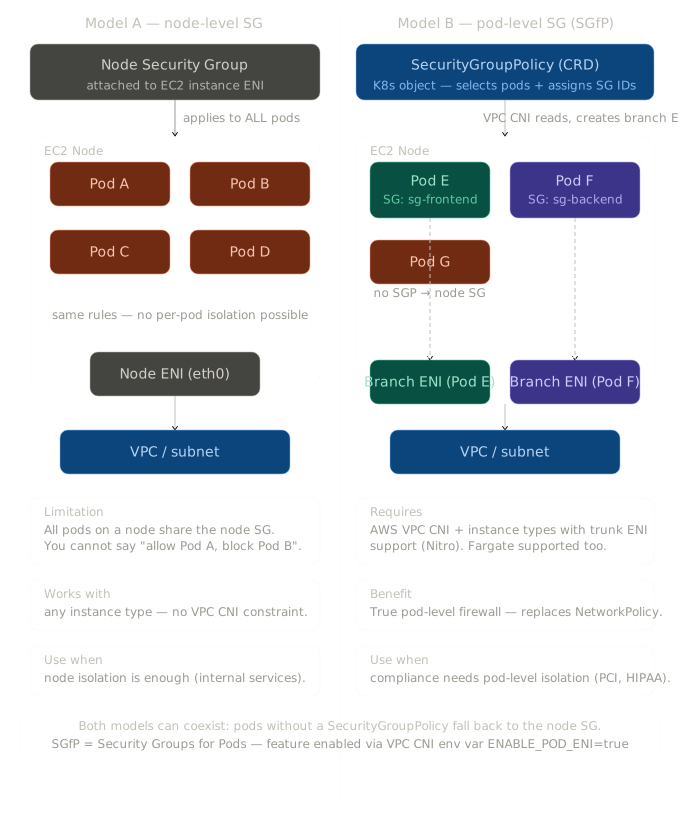
In EKS, you can also apply Security Groups directly to pods. This bridges the K8s and AWS networking worlds: your pods get the same Security Group enforcement as EC2 instances.
This is useful when you need your pods to interact with AWS resources that use Security Groups for access control (like RDS databases). Instead of opening the database to the entire node's Security Group, you assign a specific Security Group to only the pods that need database access.
Comparison: Network Policies vs Security Groups vs NACLs
| Feature | K8s Network Policies | AWS Security Groups | AWS NACLs |
|---|---|---|---|
| Scope | Pod-to-pod within cluster | ENI-level (instance or pod) | Subnet-level |
| Stateful? | Depends on CNI | Yes (return traffic auto-allowed) | No (must allow both directions) |
| Default behavior | Allow all (until a policy is applied) | Deny all inbound, allow all outbound | Allow all (default NACL) |
| Selection method | Pod labels, namespace selectors | Attached to ENIs | Applied to subnets |
| Aware of K8s concepts? | Yes (pods, namespaces, labels) | No (IP addresses and ports only) | No (IP ranges and ports only) |
| Best for | Intra-cluster segmentation | Controlling access to AWS resources | Subnet-level guardrails |
In practice, you use all three layers together. Network Policies for pod-to-pod rules, Security Groups for pod-to-AWS-resource rules, and NACLs as a coarse subnet-level safety net. Defense in depth.
Pod security
Even if your network is locked down, a compromised container running as root with full Linux capabilities is a serious problem. Pod security is about restricting what containers can do on the node.
Pod Security Standards & Pod Security Admission (PSA)
K8s defines three Pod Security Standards — profiles that describe increasing levels of restriction:
| Profile | Description | Use case |
|---|---|---|
| Privileged | Unrestricted. No security checks. | System-level workloads (CNI plugins, logging agents) |
| Baseline | Prevents known privilege escalations. Blocks hostNetwork, hostPID, privileged containers. | Most application workloads |
| Restricted | Heavily restricted. Must run as non-root, drop all capabilities, read-only root filesystem. | Security-sensitive workloads |
Pod Security Admission (PSA) enforces these standards at the namespace level using labels:
apiVersion: v1
kind: Namespace
metadata:
  name: clinical-trials
  labels:
    pod-security.kubernetes.io/enforce: restricted
    pod-security.kubernetes.io/warn: restricted
    pod-security.kubernetes.io/audit: restricted
With this configuration, any pod in clinical-trials that violates the restricted profile will be rejected. The warn and audit modes give you visibility before you enforce.
SecurityContext
For fine-grained control, every pod and container can specify a SecurityContext:
apiVersion: v1
kind: Pod
metadata:
  name: secure-analysis-job
  namespace: research
spec:
  securityContext:
    runAsNonRoot: true
    runAsUser: 1000
    fsGroup: 2000
  containers:
  - name: analyzer
    image: research-tools:v3
    securityContext:
      allowPrivilegeEscalation: false
      readOnlyRootFilesystem: true
      capabilities:
        drop:
          - ALL
    volumeMounts:
    - name: tmp
      mountPath: /tmp
    - name: results
      mountPath: /data/results
  volumes:
  - name: tmp
    emptyDir: {}
  - name: results
    persistentVolumeClaim:
      claimName: analysis-results
This pod: runs as a non-root user (UID 1000), cannot escalate privileges, has a read-only root filesystem (with writable /tmp and /data/results mounts), and drops all Linux capabilities. A compromised container in this configuration can do very little damage.
Workload isolation via scheduling constraints
For sensitive workloads that should not share nodes with untrusted workloads, you can use taints and tolerations along with node affinity:
# Taint a node group for sensitive workloads only
# kubectl taint nodes -l workload=sensitive sensitive=true:NoSchedule
# Pod that tolerates the taint and prefers sensitive nodes
spec:
  tolerations:
  - key: "sensitive"
    operator: "Equal"
    value: "true"
    effect: "NoSchedule"
  affinity:
    nodeAffinity:
      requiredDuringSchedulingIgnoredDuringExecution:
        nodeSelectorTerms:
        - matchExpressions:
          - key: workload
            operator: In
            values:
            - sensitive
This is not full multi-tenancy (K8s isn't designed for hostile multi-tenancy), but it ensures that your genomic analysis pipelines don't share hardware with less trusted workloads.
Secrets management
Every application has secrets: database passwords, API keys, TLS certificates. How you manage them in K8s matters a lot.
K8s Secrets (and why they're not really secret)
K8s has a built-in Secret object:
apiVersion: v1
kind: Secret
metadata:
  name: db-credentials
  namespace: research
type: Opaque
data:
  username: cG9zdGdyZXM=      # base64 of "postgres"
  password: c3VwZXJzZWNyZXQ=  # base64 of "supersecret"
The problem: this is base64 encoding, not encryption. Run echo c3VwZXJzZWNyZXQ= | base64 -d and you get supersecret. Anyone with kubectl get secret -o yaml access can read all your secrets. And in etcd, they're stored in plain text (well, base64).
K8s Secrets are useful as a delivery mechanism (mounting credentials into pods), but they are not a secret store.
Encryption at rest with KMS
The minimum you should do: enable encryption at rest for etcd. In EKS, this is straightforward — you provide a KMS key when creating or updating the cluster:
aws eks create-cluster \
  --name my-cluster \
  --encryption-config '[{
    "resources": ["secrets"],
    "provider": {
      "keyArn": "arn:aws:kms:eu-west-3:123456789012:key/your-kms-key-id"
    }
  }]' \
  ...
Now secrets are encrypted in etcd using your KMS key. This protects against someone gaining access to the underlying storage — but anyone with RBAC permissions to get secrets can still read them through the API.
External secret stores
For production, you should integrate with a dedicated secret management solution:
AWS Secrets Manager or AWS Systems Manager Parameter Store: Store secrets in AWS, fetch them into K8s at runtime. The AWS Secrets Store CSI Driver mounts AWS secrets as volumes in your pods.
External Secrets Operator: A K8s operator that syncs secrets from external stores (AWS Secrets Manager, HashiCorp Vault, GCP Secret Manager) into K8s Secret objects. You define an ExternalSecret resource, and the operator keeps the K8s Secret in sync:
apiVersion: external-secrets.io/v1beta1
kind: ExternalSecret
metadata:
  name: db-credentials
  namespace: research
spec:
  refreshInterval: 1h
  secretStoreRef:
    name: aws-secrets-manager
    kind: ClusterSecretStore
  target:
    name: db-credentials
  data:
  - secretKey: username
    remoteRef:
      key: research/db-credentials
      property: username
  - secretKey: password
    remoteRef:
      key: research/db-credentials
      property: password
Sealed Secrets: Encrypts secrets so they can be safely stored in Git. A controller in the cluster decrypts them. Useful for GitOps workflows where you want everything in version control but can't commit plain secrets.
The pattern is: secrets live in a dedicated, encrypted, access-controlled store (AWS Secrets Manager, Vault); K8s fetches them at runtime (via CSI driver or operator); RBAC limits who can access them within the cluster.
Resource quotas & LimitRanges
This is the security concern people forget: resource abuse. A single runaway pod consuming all CPU or memory on a node is a denial-of-service attack — even if it's accidental. In a shared cluster (multiple teams, multiple namespaces), resource guardrails are essential.
ResourceQuotas
A ResourceQuota sets hard limits on what a namespace can consume:
apiVersion: v1
kind: ResourceQuota
metadata:
  name: research-quota
  namespace: genomics
spec:
  hard:
    requests.cpu: "20"
    requests.memory: 40Gi
    limits.cpu: "40"
    limits.memory: 80Gi
    pods: "50"
    persistentvolumeclaims: "10"
    services.loadbalancers: "2"
This ensures the genomics team can't accidentally (or intentionally) starve the clinical trials team of resources. It's the K8s equivalent of disk quotas and ulimit — applied at the namespace level.
LimitRanges
While ResourceQuotas cap the total for a namespace, LimitRanges set per-pod defaults and limits:
apiVersion: v1
kind: LimitRange
metadata:
  name: default-limits
  namespace: genomics
spec:
  limits:
  - default:
      cpu: "500m"
      memory: 256Mi
    defaultRequest:
      cpu: "100m"
      memory: 128Mi
    max:
      cpu: "4"
      memory: 8Gi
    min:
      cpu: "50m"
      memory: 64Mi
    type: Container
If a developer deploys a pod without specifying resource requests/limits, LimitRange fills in the defaults. If they request more than the max, the pod is rejected. This prevents the classic "someone deployed a pod with no limits and it ate the entire node" scenario.
Audit & observability
You can't secure what you can't see. Audit logging answers the question: who did what, when, and from where?
K8s audit logging
The K8s API server can log every request it receives. Audit events are categorized by stage:
- RequestReceived: The request was received but not yet processed
- ResponseStarted: Response headers sent, body not yet (for long-running requests like
watch) - ResponseComplete: The full response was sent
- Panic: Something went very wrong
And by level:
- None: Don't log
- Metadata: Log request metadata (user, timestamp, resource, verb) but not body
- Request: Log metadata + request body
- RequestResponse: Log everything (metadata + request body + response body)
An audit policy defines what to log for different resources:
apiVersion: audit.k8s.io/v1
kind: Policy
rules:
# Log all changes to secrets at the RequestResponse level
- level: RequestResponse
  resources:
  - group: ""
    resources: ["secrets"]
# Log pod changes at the Request level
- level: Request
  resources:
  - group: ""
    resources: ["pods"]
  verbs: ["create", "update", "patch", "delete"]
# Log everything else at Metadata level
- level: Metadata
EKS control plane logging → CloudWatch
In EKS, you don't configure the audit policy directly (the control plane is managed). Instead, you enable EKS control plane logging which sends logs to CloudWatch:
aws eks update-cluster-config \
  --name my-cluster \
  --logging '{
    "clusterLogging": [{
      "types": ["api", "audit", "authenticator", "controllerManager", "scheduler"],
      "enabled": true
    }]
  }'
The five log types:
- api: API server request logs
- audit: K8s audit logs (who did what)
- authenticator: IAM authentication events
- controllerManager: Controller decisions (scaling, reconciliation)
- scheduler: Pod placement decisions
Connecting to CloudTrail
Here's where the AWS training series comes full circle. CloudTrail records AWS API calls — CreateCluster, UpdateNodegroup, AssociateEncryptionConfig. CloudWatch Logs receives K8s-level audit events — kubectl apply, kubectl delete, kubectl exec.
Together, they give you the full picture:
- CloudTrail: "Who created the cluster? Who changed the node group? Who modified IAM roles?"
- CloudWatch (K8s audit logs): "Who deployed this pod? Who accessed this secret? Who exec'd into that container?"
For a biomedical research environment handling sensitive patient data, this level of traceability isn't optional — it's often a compliance requirement (HIPAA, GDPR).
Best practices checklist
Here's what "secure by default" should look like, organized by layer:
Identity & Access
- Apply least-privilege RBAC: namespace-scoped Roles over ClusterRoles
- Create dedicated Service Accounts per workload; disable auto-mount for pods that don't need API access
- Use IRSA or EKS Pod Identity for AWS access — never store AWS credentials as K8s Secrets
- Audit RoleBindings and ClusterRoleBindings regularly
Network
- Apply default-deny NetworkPolicies to every namespace
- Segment namespaces by trust level (production vs staging, team A vs team B)
- Use Security Groups for Pods when controlling access to AWS resources
- Restrict API server endpoint access (private endpoint in EKS)
Pods
- Enforce Pod Security Standards (at least
baseline, ideallyrestricted) - Run containers as non-root, with read-only root filesystem
- Drop all Linux capabilities, add back only what's needed
- Use taints/tolerations to isolate sensitive workloads on dedicated nodes
Secrets
- Enable etcd encryption at rest (KMS key in EKS)
- Use an external secret store (AWS Secrets Manager, Vault) — not raw K8s Secrets
- Rotate secrets automatically; never commit secrets to Git in plain text
Audit & Observability
- Enable all EKS control plane log types (api, audit, authenticator, controllerManager, scheduler)
- Set up alerts for privilege escalation attempts,
kubectl execinto production pods, secret access patterns - Cross-reference K8s audit logs with CloudTrail for full traceability
Supply Chain
- Scan container images for vulnerabilities (Trivy, Snyk, ECR image scanning)
- Use trusted base images from verified registries
- Sign and verify container images (cosign, Notation)
- Pin image tags to digests (
image: my-app@sha256:abc123...instead ofimage: my-app:latest)
For a comprehensive, opinionated, and up-to-date reference, see the AWS EKS Best Practices Guide.
Security consists of a series of layers that are stacked on top of one another. K8s gives you all the layers: RBAC, Network Policies, Pod Security Admission, audit logging, Secrets encryption. But it doesn't stack them on for you. The defaults are permissive by design, because K8s optimizes for getting things running.
I've got a terrible headache, I've learnt a lot of new concepts this week, but I can tell I haven't quite got the hang of them yet. In the mean time, here are resources for you to go further:
Official documentation:
- K8s security documentation
- AWS EKS best practices guide - Security
- Pod Security Standards
- Network Policies
- RBAC documentation
Tools:
- Trivy - container image scanner
- External Secrets Operator
- Sealed Secrets
- Calico Network Policies for EKS
- kube-bench - CIS K8s Benchmark checker
- Falco - runtime security
Video tutorials:
- K8s security best practices
- RBAC explained
- Understand RBAC in k8s
- Network Policies explained
- 7 k8s security best practices