
Disclaimers :
Opinions expressed in this post (and in any of all my posts) are solely, unless otherwise specified, those of the authors, me. Those opinions absolutely do not reflect the views, policies, positions of any organizations, employers, affiliated groups.
This article is educational content. The examples are intentionally simplified for clarity. All tools featured here are free and open-source software — they run identically on EKS, GKE, bare metal, or your laptop.
I've strived for accuracy throughout this piece. If you catch any errors, please reach out — I'd be grateful for the feedback and happy to make updates!
Hook
The genomics API is running. Terraform provisioned the cluster, Helm deployed the application. From the outside, everything looks fine.
Then, a researcher reports that their variant analysis job submitted two hours ago still hasn't returned results. You check Kubernetes: the pods are running. You check the load balancer: it's healthy. The deployment logs show no errors. But something is wrong, and you have absolutely no idea where to start looking.
That's the moment you realise your system is blind. You built the infrastructure. You secured it. You automated its deployment. And then you flew it into production with no instruments.
This article is about fixing that. Not by adding monitoring as an afterthought, but by building the kind of visibility that lets you answer three questions before your users even notice a problem: what is happening, why is it happening, and where exactly is it happening? No worries, I'm not there yet. Lord knows how much 4s misses observability & monitoring :\
ToC
- Observability vs monitoring
- The four pillars
- The tooling landscape
- OpenTelemetry: the collection standard
- SLI, SLO, SLA: from data to accountability
- Conclusion
Observability vs monitoring
These two words are often used interchangeably. They shouldn't be.
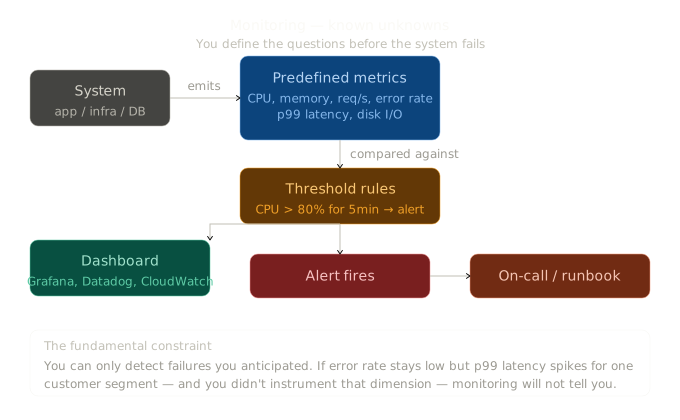
Monitoring is about watching known failure modes. You define thresholds — CPU above 80%, error rate above 1% — and you alert when they're crossed. It answers the question: "is this thing I already know about happening?" Monitoring is reactive: you first have to know what can go wrong before you can monitor for it.
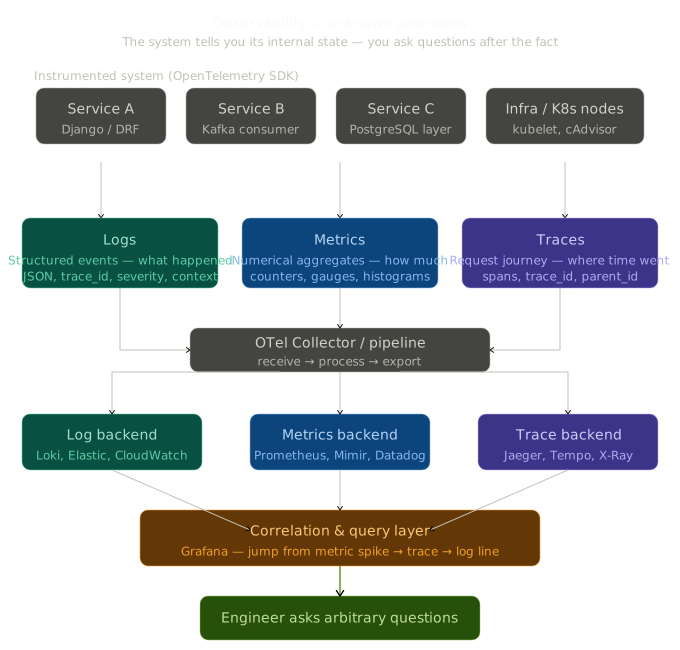
Observability is about understanding unknown failure modes from the outside. A system is observable if you can ask arbitrary questions about its internal state — without having predicted those questions in advance. It answers: "why is this behaving the way it is?"
In practice, you need both. Monitoring te dit "quelque chose est cassé". Observability te permet de répondre à "pourquoi est-ce cassé, exactement, pour qui, depuis quand, et dans quel contexte" — même pour des pannes que tu n'avais pas anticipées.
In a K8s cluster, failures are often not the ones you predicted. A genomic analysis pipeline stalls not because of high CPU, but because a database connection pool is exhausted by a single slow query in one namespace — and your monitoring threshold was on the wrong metric entirely. Observability gives you the tools to discover that. Monitoring alone doesn't.
The four pillars
Cloud-native observability is built on four pillars. Together, they give you a complete picture of a running system.
Logs — what happened
Logs are timestamped records of discrete events: a request came in, a query failed, a job completed. They are the most familiar signal and the easiest to produce — every Django app already writes logs.
On Kubernetes, logs have a structural challenge: pods are ephemeral. When a pod crashes and restarts, its logs disappear. You need a log aggregation layer that collects logs from all pods, across all nodes, and stores them centrally before they vanish.
Answers: "What exactly happened at 14:32:07 in the genomics namespace?"
Metrics — how much
Metrics are numeric measurements sampled over time: request rate, error rate, latency percentiles, CPU usage, memory consumption, active database connections. They are cheap to store, fast to query, and ideal for alerting and dashboards.
Metrics don't tell you why something is slow — but they tell you that it is slow and when it started.
Answers: "How many analysis requests failed in the last hour, and is that number growing?"
Traces — the full journey
A trace follows a single request through every service it touches. In a microservices or multi-component architecture, a single API call might touch a Django view, a Celery task, a PostgreSQL query, and an S3 upload. A trace connects all of these into a single timeline, with durations for each step.
Traces are the pillar that answers the question logs and metrics can't: "the request was slow — but which part of it was slow?"
Answers: "The variant analysis request took 4.2 seconds — 3.8 seconds of which was a single database query in the pipeline."
Kubernetes events — what the cluster decided
Kubernetes emits events for everything it does: pod scheduled, pod evicted, image pull failed, node pressure detected, HPA scaled up. These events are not logs (they come from the control plane, not the application) and not metrics (they are discrete, not continuous). They are a fourth pillar that explains cluster-level behaviour.
Answers: "The pod restarted three times because the node ran out of memory — not because the application crashed."
The tooling landscape
Two paths exist for implementing this stack on Kubernetes.
| Signal | AWS-native | Open source |
|---|---|---|
| Logs | CloudWatch Logs | Loki + Promtail |
| Metrics | CloudWatch Metrics | Prometheus + node-exporter |
| Traces | AWS X-Ray | Jaeger |
| Visualisation | CloudWatch Dashboards | Grafana |
| Instrumentation | AWS Distro for OpenTelemetry | OpenTelemetry |
| Alerting | CloudWatch Alarms | Prometheus Alertmanager |
We are going with the open-source stack. These tools run identically on EKS, GKE, bare metal, or your laptop. They have no vendor lock-in, no per-metric pricing, and a massive community behind each of them. If the genomics platform ever moves off AWS, the observability layer moves with it unchanged.
How the pieces fit together
Django app
  └─ OTel SDK (auto-instrumentation)
       └─ OTel Collector
            ├─ metrics ──→ Prometheus ──→ Grafana
            ├─ logs ─────→ Loki ─────────→ Grafana
            └─ traces ───→ Jaeger ────────→ Grafana
                                    Alertmanager ──→ PagerDuty / Slack
A single OTel Collector acts as the central routing layer — your application sends all three signal types to one endpoint, and the collector fans them out to the right backends. Grafana sits on top of all three, giving you a unified view. This architecture means your application code only knows about one destination: the collector.
Deploying the stack with Helm
From Day 6, you already know how to use Helm. The entire observability stack is available as Helm charts:
helm repo add prometheus-community https://prometheus-community.github.io/helm-charts
helm repo add grafana https://grafana.github.io/helm-charts
helm repo add jaegertracing https://jaegertracing.github.io/helm-charts
helm repo add open-telemetry https://open-telemetry.github.io/opentelemetry-helm-charts
helm repo update

# Prometheus + Grafana + Alertmanager — all in one chart
helm install kube-prometheus-stack \
  prometheus-community/kube-prometheus-stack \
  --namespace monitoring \
  --create-namespace

# Loki + Promtail (log collection from all pods)
helm install loki grafana/loki-stack \
  --namespace monitoring \
  --set promtail.enabled=true

# Jaeger (distributed tracing backend)
helm install jaeger jaegertracing/jaeger \
  --namespace monitoring

# OpenTelemetry Collector (the routing layer)
helm install otel-collector \
  open-telemetry/opentelemetry-collector \
  --namespace monitoring \
  --values otel-collector-values.yaml
OpenTelemetry: the collection standard
OpenTelemetry (OTel) is a CNCF project that provides a single, vendor-neutral standard for producing and collecting observability data. Before OTel, you needed separate SDKs for Prometheus, Jaeger, and your logging library — each with different APIs and configuration. OTel unifies them: one SDK, one wire protocol, one collector.
It has two parts: the SDK (what you add to your application to produce telemetry) and the Collector (the agent that receives, processes, and exports it).
The OTel Collector: central routing
The collector is configured as a pipeline: receivers → processors → exporters. Here is the configuration for our stack (otel-collector-values.yaml):
config:
  receivers:
    otlp:
      protocols:
        grpc:
          endpoint: 0.0.0.0:4317
        http:
          endpoint: 0.0.0.0:4318

  processors:
    batch: {}
    memory_limiter:
      limit_mib: 512

  exporters:
    prometheus:
      endpoint: "0.0.0.0:8889"
    loki:
      endpoint: http://loki:3100/loki/api/v1/push
    jaeger:
      endpoint: jaeger-collector:14250
      tls:
        insecure: true

  service:
    pipelines:
      metrics:
        receivers: [otlp]
        processors: [memory_limiter, batch]
        exporters: [prometheus]
      logs:
        receivers: [otlp]
        processors: [memory_limiter, batch]
        exporters: [loki]
      traces:
        receivers: [otlp]
        processors: [memory_limiter, batch]
        exporters: [jaeger]
Three pipelines, three backends — your application only talks to port 4317.
Instrumenting the Django API
The genomics API needs two things: a way to produce telemetry (the OTel SDK) and a way to expose metrics for Prometheus to scrape (the django-prometheus package).
Dependencies:
pip install \
  opentelemetry-sdk \
  opentelemetry-instrumentation-django \
  opentelemetry-instrumentation-psycopg2 \
  opentelemetry-exporter-otlp-proto-grpc \
  django-prometheus
Auto-instrumentation setup — the right place to call this is AppConfig.ready() in your app's apps.py, which runs exactly once on startup regardless of whether you're using manage.py, a WSGI server, or an ASGI server:
from opentelemetry import trace
from opentelemetry.sdk.trace import TracerProvider
from opentelemetry.sdk.trace.export import BatchSpanProcessor
from opentelemetry.exporter.otlp.proto.grpc.trace_exporter import OTLPSpanExporter
from opentelemetry.instrumentation.django import DjangoInstrumentor
from opentelemetry.instrumentation.psycopg2 import Psycopg2Instrumentor

def configure_tracing():
    provider = TracerProvider()
    exporter = OTLPSpanExporter(
        endpoint="http://otel-collector.monitoring:4317",
        insecure=True
    )
    provider.add_span_processor(BatchSpanProcessor(exporter))
    trace.set_tracer_provider(provider)

    # Auto-instrument Django HTTP requests and PostgreSQL queries
    DjangoInstrumentor().instrument()
    Psycopg2Instrumentor().instrument()
# yourapp/apps.py
from django.apps import AppConfig

class YourAppConfig(AppConfig):
    name = "yourapp"

    def ready(self):
        configure_tracing()
With this in place, every HTTP request and every database query is automatically traced — no manual instrumentation needed for the infrastructure layer.
Custom spans for business logic — the above covers HTTP and database calls automatically. For domain-specific visibility into your own code, add manual spans:
# analysis/views.py
from opentelemetry import trace

tracer = trace.get_tracer(__name__)

def run_variant_analysis(request, patient_id):
    with tracer.start_as_current_span("variant-analysis") as span:
        span.set_attribute("patient.id", patient_id)
        span.set_attribute("analysis.type", "variant-calling")

        result = VariantCallingPipeline.run(patient_id)

        span.set_attribute("analysis.variants_found", result.variant_count)
        span.set_attribute("analysis.duration_ms", result.duration_ms)
        return JsonResponse(result.to_dict())
Now when an analysis is slow, the trace shows exactly where the time went: Django view setup, PostgreSQL query, pipeline execution, response serialisation — each as a separate span with its own duration.
Exposing metrics for Prometheus
Add django-prometheus to INSTALLED_APPS and wire up the metrics endpoint:
# settings.py
INSTALLED_APPS = [
    ...
    'django_prometheus',
]

MIDDLEWARE = [
    'django_prometheus.middleware.PrometheusBeforeMiddleware',
    ...
    'django_prometheus.middleware.PrometheusAfterMiddleware',
]
# urls.py
from django.urls import path, include

urlpatterns = [
    path('', include('django_prometheus.urls')),  # exposes /metrics
    ...
]
Then tell Prometheus to scrape it with a ServiceMonitor (from the kube-prometheus-stack CRDs):
apiVersion: monitoring.coreos.com/v1
kind: ServiceMonitor
metadata:
  name: genomics-api
  namespace: monitoring
spec:
  selector:
    matchLabels:
      app: genomics-api
  namespaceSelector:
    matchNames:
      - genomics
  endpoints:
  - port: http
    path: /metrics
    interval: 30s
Prometheus now automatically discovers and scrapes the genomics API every 30 seconds. No manual configuration when pods are rescheduled.
SLI, SLO, SLA: from data to accountability
Collecting telemetry is pointless without defining what good looks like. SLI, SLO, and SLA are the framework for turning raw observability data into meaningful commitments.
SLI (Service Level Indicator) — a measurement. A specific, quantifiable signal that reflects the user experience:
"The percentage of analysis API requests that return in under 2 seconds."
SLO (Service Level Objective) — the target you set for that indicator:
"99% of analysis requests should return in under 2 seconds, measured over a rolling 30-day window."
SLA (Service Level Agreement) — the formal commitment to external parties, with consequences:
"If availability drops below 99.5% in any calendar month, affected institutions receive a service credit."
The gap between your SLO (99%) and 100% is your error budget — the room you have to take risks, deploy changes, and absorb incidents without breaching your commitment. If you have a 1% error budget over 30 days, that's about 7 hours of degraded service you can afford. Spend it wisely.
Measuring the SLI in Prometheus
groups:
- name: genomics-api.sli
  rules:
  - record: job:genomics_api_p99_latency_seconds
    expr: |
      histogram_quantile(0.99,
        rate(django_http_requests_latency_seconds_by_view_method_bucket{
          job="genomics-api",
          view="run_variant_analysis"
        }[5m])
      )
Alerting when the error budget burns too fast
groups:
- name: genomics-api.slo
  rules:
  - alert: AnalysisAPIErrorBudgetBurn
    expr: |
      (
        rate(django_http_responses_total_by_status_view_method_total{
          job="genomics-api",
          status=~"5.."
        }[1h])
        /
        rate(django_http_responses_total_by_status_view_method_total{
          job="genomics-api"
        }[1h])
      ) > 0.01
    for: 5m
    labels:
      severity: warning
      team: genomics-platform
    annotations:
      summary: "Genomics API error rate above SLO threshold"
      description: >
        Error rate is {{ $value | humanizePercentage }}.
        At this rate, the monthly error budget will be exhausted in
        {{ printf "%.1f" (div 0.01 $value | mul 720) }} hours.
This alert doesn't just tell you that the error rate is high — it tells you how quickly you are burning through your error budget, so you can decide whether to roll back immediately or investigate first.
A good alerting rule alerts on user impact, not on infrastructure symptoms. "Error budget burning at 10x" is more actionable than "CPU at 78%".
Conclusion
A deployed system that you can't observe is a system you don't fully control. Logs tell you what happened. Metrics tell you how much and how often. Traces tell you where exactly things went wrong. Kubernetes events tell you what the cluster itself was doing. Together, they answer the question that every production incident eventually raises: "what on earth is going on in there?"
The open-source stack — Prometheus, Grafana, Loki, Jaeger, OpenTelemetry — gives you all of this without vendor lock-in. It runs on EKS today, on bare metal tomorrow, on a laptop for local debugging when you need it. The investment in learning these tools pays dividends regardless of which cloud you're on.
And SLI/SLO/SLA takes that data one step further: it turns raw signals into a shared language between the people who build the system and the people who depend on it. Error budgets make the trade-off between reliability and velocity explicit, instead of leaving it as a permanent source of tension.
The platform is now provisioned, secured, deployed, and observable. That's a complete stack — and the knowledge to rebuild it anywhere.
Official documentation:
- OpenTelemetry documentation
- OpenTelemetry Python SDK
- Prometheus documentation
- Grafana documentation
- Loki documentation
- Jaeger documentation
- Prometheus Alertmanager
Tools:
- kube-prometheus-stack Helm chart — Prometheus + Grafana + Alertmanager in one chart
- django-prometheus — Prometheus metrics for Django
- opentelemetry-instrumentation-django — auto-instrumentation for Django
- Google SRE book — SLI/SLO/SLA chapter — the canonical reference
Video tutorials: